School IT readiness is the make-or-break work that decides whether your building opens Fall 2026 connected and secure — or scrambling. Charter schools are growing while traditional districts shrink. According to NAPCS's 2025 enrollment brief, charters added 111,349 students in the most recent year while district enrollment fell by 221,729 — nearly 4 million kids now attend more than 8,100 charter schools. That growth comes with a catch: most charters don't have a district IT department down the hall. The work lands on a small team, sometimes one person, sometimes a partner.
This checklist gets you there. Eight steps, in the order that matters, to start the year connected, secure, and ready on day one.
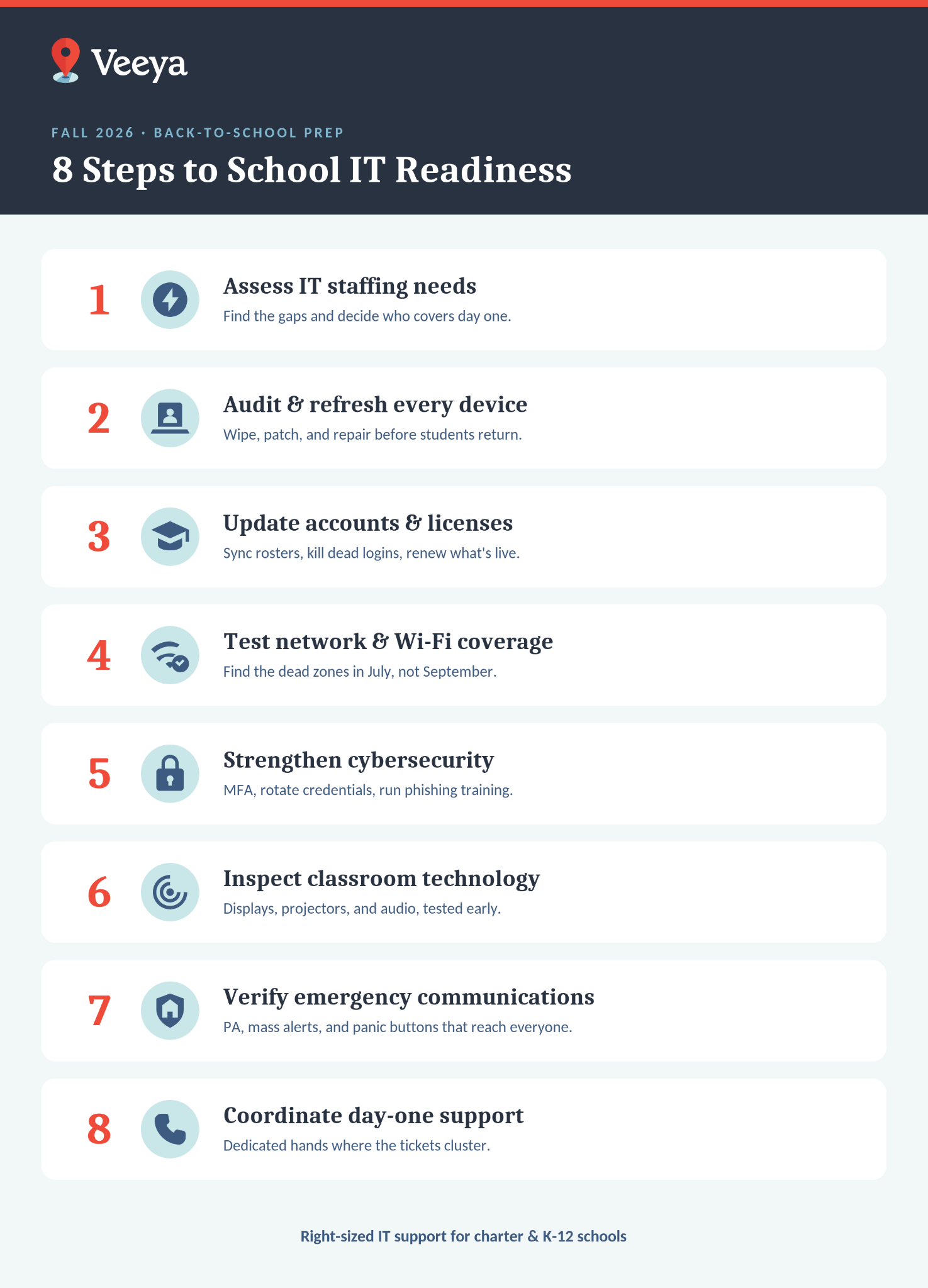
Quick Guide: 8 Steps to School IT Readiness
- Assess your IT staffing needs — Find the gaps in your team and decide who covers day one.
- Audit and refresh every device — Clean, update, and repair laptops, tablets, and desktops before students return.
- Update accounts and software licenses — Sync rosters, kill old accounts, confirm every license is current.
- Test your network and Wi-Fi — Run speed tests and hunt down dead zones before the traffic hits.
- Tighten cybersecurity — Rotate credentials, turn on multi-factor authentication, confirm endpoint protection is live.
- Inspect classroom tech — Verify displays, projectors, and audio work before the first lesson.
- Test emergency communications — Check PA systems, alert platforms, and parent notifications for full campus reach.
- Line up day-one support — Assign dedicated staff or a managed partner for fast response week one.
How to Strengthen School IT Readiness Before Fall 2026
Start with staffing, then work through devices, accounts, network, security, classroom tech, emergency systems, and day-one coverage — in that order. Each step below builds on the one before it.
1. How Many IT People Do You Actually Need?
Count hands first, because staffing is where most schools come up short. According to CoSN's 2026 State of EdTech report, 78% of very small districts run on just one to three IT staff — and that's the reality for most single-site and small-network charters. The same report found 65% of ed-tech leaders say they lack the staff to handle cybersecurity, and 58% are understaffed for instructional technology.
So ask the honest question: can your team cover summer prep and the first-week surge? If the answer is "maybe," it's no. Decide now whether you need another technician, help-desk coverage, or a co-managed partner to fill the gap before August.
Cross-train whoever you have. If your one network person takes a July vacation or quits mid-summer, you don't want the whole rollout stalling behind them. Charter boards ask hard questions when the school year opens rough, so build the backup coverage before they have to.
2. Audit and Refresh Every Student and Staff Device
Every device coming back to a classroom needs a full refresh cycle: OS upgrades, security patches, and a physical once-over. No exceptions.
Student laptops and tablets carry a year of cached files, saved logins, and browser junk. Wipe and reimage them. Clean machines mean fewer mystery tickets in September and faster troubleshooting when something does break.
Don't skip teacher workstations and your loaner pool. Cracked screens, dead batteries, and busted hinges don't heal over summer. Schedule repairs early so parts arrive before August since waiting until the last week means paying rush shipping on a lean budget, or worse, opening the year short on devices.
3. Update User Accounts and Software Licenses
Get your rosters and licenses right before staff return, or day one breaks. Your LMS (Google Classroom, Canvas, whatever you run) needs current rosters and correct teacher assignments loaded before the first bell.
Decommission accounts for students who graduated, transferred, or withdrew, and handle their data by your retention policy. That keeps you FERPA-compliant and protects student privacy. For charters, it also keeps you clean for board and authorizer review.
Then audit your software licenses. Are you paying for platforms teachers stopped opening last October? Expired licenses lock people out on day one. Unused ones quietly drain a budget you can't afford to waste. Cut what's dead, renew what's live.
4. Can Your Network Handle a Full Load?
Test it before you find out the hard way. A full building full of students hitting the system during standardized testing, or staff running smart boards and other tools is a very different load than an empty summer campus. Run a speed test and map every weak zone before you have a problem at benchmark, pre-ACT or state testing.
Cafeterias, gyms, and outdoor spaces are the usual dead-zone suspects. Adding or repositioning access points in July is easy. Doing it during first-week chaos is not.
One timely note for any charter leaning on hotspots for off-campus access: on September 30, 2025, the FCC ended E-Rate support for Wi-Fi hotspot lending and school-bus Wi-Fi. If your connectivity plan assumes that funding, rework it now — don't let it surprise you mid-year. And if bandwidth complaints piled up last spring, price a capacity upgrade while you have time to plan for it.
5. Test Cybersecurity Before the Attackers Do
Schools are prime targets, and the numbers are stark. The CIS MS-ISAC 2025 K-12 report found 82% of reporting schools experienced cyber threat impacts, and attackers go after human behavior 45% more than technical flaws. Other sources pegged the average K-12 ransomware recovery at $2.28 million in 2024 — a number that would end a small charter. And ransomware on education climbed 23% year over year in the first half of 2025, per Comparitech. A quiet summer is when you close both the technical and the human gaps.
On the technical side: update firewall firmware, rotate admin credentials, and confirm endpoint protection is deployed on every managed device. Turn on multi-factor authentication for staff accounts. If you haven't done that yet, it's the single highest-value thing on this list.
On the human side: run cybersecurity awareness training before teachers walk back in. Phishing was the top root cause of attacks on lower education, at 22%. A 20-minute refresher on spotting a phishing email is cheaper than a $2.28 million recovery — and worth asking whether the FCC's Cybersecurity Pilot (up to $200 million, 700-plus schools already selected) can help fund your defenses.
6. Inspect and Test Every Piece of Classroom Tech
Plug it all in and test it now — displays, projectors, document cameras, audio. Most of it sat untouched all summer, and some of it won't wake up right.
Confirm firmware is current and drivers are updated. Stock the consumables too: batteries, spare chargers, the adapters teachers always lose. Nobody should be hunting for a dongle during a lesson.
Walk through anything unfamiliar with teachers ahead of time. A 15-minute check in August beats a 45-minute classroom delay in September. That math always works.
7. Verify Emergency Communication Systems
Test every alert tool before students arrive — PA systems, mass notification platforms, parent apps. Can your admin team reach every classroom instantly? Can you push an update to families in minutes? Prove it now, not during an actual emergency.
Schools usually discover the gaps only after an alert fails to reach the right people. Confirm your workflows cover everyone who needs to respond, not just a short list of names.
If you operate under Alyssa's Law, this step isn't optional. Per the Security Industry Association and Make Our Schools Safe, Alyssa's Law is enacted in roughly 16 states as of 2026, with about 18 more pending. Confirm your silent panic alert integrations fire correctly and your law enforcement connections are live.
8. Coordinate IT Support Coverage for Day One
Assign your coverage now, because problems will surface no matter how well you prep. Password resets, login errors, and hardware failures pile up fast when hundreds of students show up at once.
Put dedicated people in the high-traffic spots — front office, computer labs, wherever the tickets cluster. If your internal team is already stretched (and per CoSN, most small schools are), bring in a managed partner for overflow instead of burning out your one technician.
A hybrid model works best: onsite hands for physical hardware, remote help-desk for quick software fixes. That way you get fast response wherever the problem lands.
Why Do Schools Fall Behind on Back-to-School IT Readiness?
They run out of time, and small teams run out first. Device repairs take longer than expected, staff vacations overlap, and the window between budget approval and first bell shrinks every year.
Staffing is the core problem. When 78% of very small districts operate with one to three IT staff (CoSN, 2026), a single vacancy or vacation stalls the whole prep list. There's no bench. For a charter with no district IT office to borrow from, that gap is even sharper.
The fallout shows up in September: login failures on day one, dead displays in classrooms, and help-desk queues that take days to clear. Starting early and assigning clear ownership for each task is what prevents the scramble.
How Can Coordinated Staffing Improve IT Preparedness?
Coordinated staffing means matching your team's capacity to your technology calendar — assigning specific people to specific tasks before summer starts, instead of reacting once things break.
Build a checklist with owners and deadlines. One person owns device audits. Another owns network testing. A third owns software updates. When every task has a name attached, nothing slips.
When your team can't cover it all — which is most small charters — a co-managed partnership fills the gap. You keep control of strategy and budget. You get extra technicians, monitoring, and specialized expertise exactly when the calendar demands it.
How Veeya Helps You Achieve Back-to-School IT Readiness
Veeya gives charter and K-12 schools right-sized IT support that flexes with your needs and scales as you grow. Device management, network monitoring, cybersecurity, emergency communications — Veeya handles the technical work so your staff can stay focused on students.
We've spent over a decade inside school buildings. We know bell schedules, lean budgets, E-Rate deadlines, and what a board expects when the year opens. You get a dedicated technology partner who plans your device rollouts, tests your infrastructure, and trains your team. Not a faceless help desk that reads from a script.
If your goal is to open Fall 2026 equipped, connected, and confident, we're ready. Let's make your technology work as hard as your mission does.
FAQs About School IT Readiness
When should schools start preparing IT for the new school year?
Late spring, before summer break begins. That gives your team time to assess staffing, order parts, and schedule repairs before people scatter for vacation. Build a checklist with deadlines and clear owners so nothing gets lost while the building is quiet.
What are the most common IT issues schools face on the first day?
Login failures, Wi-Fi congestion, and dead classroom displays top the list. They almost always trace back to the same three misses: incomplete device refreshes, expired software licenses, or a network nobody tested under real load.
How can small IT teams handle back-to-school prep with limited staff?
Prioritize the tasks with the biggest day-one impact: device imaging, network testing, and cybersecurity updates. With 78% of very small districts running on one to three IT staff (CoSN, 2026), you can't do everything at once — so do the high-impact work first and bring in co-managed help for the rest. Veeya adds hands during crunch periods without adding permanent headcount.
What should schools look for in a managed IT partner for education?
Direct K-12 and charter experience — someone who knows educational technology, E-Rate funding, and compliance instead of learning it on your dime. Veeya has worked in school buildings since day one, with field-tested expertise generic IT vendors can't fake.
How does coordinated staffing reduce first-week IT problems?
When each person owns a specific task — device audits, software updates, network checks — accountability goes up and gaps shrink. It turns reactive troubleshooting into planned preparation, which is the whole difference between a smooth open and a rough one.
Can E-Rate funding help charter schools improve IT readiness?
Yes, for eligible services like network equipment, Wi-Fi access points, and cabling — and the FCC's Cybersecurity Pilot (up to $200 million) opened new room for security funding. One important change: on September 30, 2025, the FCC ended E-Rate support for Wi-Fi hotspot lending and school-bus Wi-Fi, so any charter relying on hotspots for off-campus access needs a new plan. Veeya helps schools work through E-Rate applications and find funding that stretches a tight IT budget further.